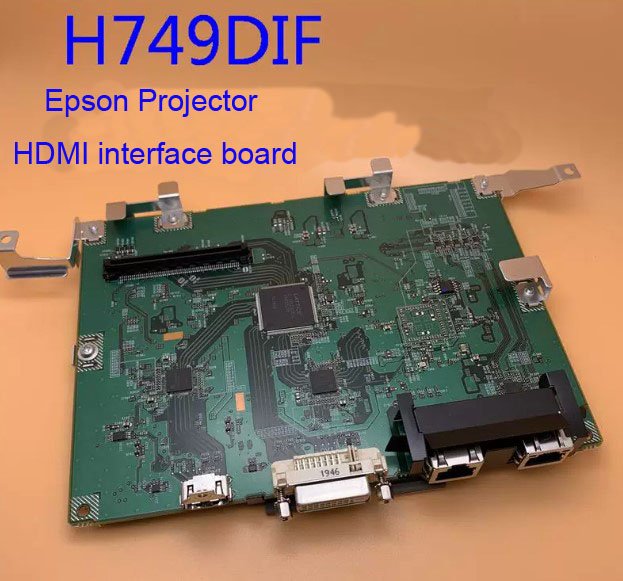
Epson H749DIF HDMI Interface Board – Genuine Replacement for CB‑L1100U / L1105U / L1200U Laser Projectors
If your Epson CB‑L1100U, L1105U, or L1200U laser projector has a dead HDMI input – no signal detection, flickering picture, pink or green color casts, or the image cuts in and out despite working cables – the HDMI interface board is very often the culprit. This genuine Epson H749DIF HDMI board is the exact service part that restores full HDMI connectivity.
It’s not a refurbished pull or a third‑party clone. Original Epson PCB, factory‑programmed HDCP keys, and matched impedance traces for 4K signal integrity. The board is labelled H749DIF – match it with your original before ordering.
| Compatible Models | Epson CB‑L1100U (EB‑L1100U), CB‑L1105U (EB‑L1105U), CB‑L1200U (EB‑L1200U) Also fits: CB‑L1500U / L1505U series that use the same HDMI input assembly |
|---|---|
| Part Number | H749DIF (Epson Service Code) |
| Component Type | HDMI Interface Board – Handles HDMI 1/2 input switching, HDCP decryption, and signal equalization |
| Condition | New, original Epson service part (not refurbished) |
| Installation | Direct replacement – remove old HDMI board from the rear I/O panel, disconnect flex cable, install new board. No soldering required. |
| Service Manual | Available upon request for CB‑L series laser projectors – ask for the download link |
Why the HDMI board fails – and why you need the genuine H749DIF
Large‑venue laser projectors often run 12‑16 hours a day, generating significant heat near the rear I/O panel. Over time, the HDMI interface board’s HDCP chip can fail, or the signal equalization circuits degrade. Common generic defects include:
- HDMI ports stop detecting any source
- Picture flickers or drops out every few seconds
- Colors are wrong (green or pink cast) from a single HDMI input
- Only one HDMI port works while the other is dead
- The input is detected but no image appears (black screen)
A non‑original replacement board may have mismatched HDCP firmware, causing handshake failures with certain sources (Blu‑ray players, laptops, switchers). This genuine H749DIF has the correct HDCP 2.2/1.4 keys and proper signal redrivers – plug‑and‑play with your existing cables and sources.
When to replace the HDMI board vs. the mainboard
If all other inputs (VGA, DVI‑D, HDBaseT) work normally but HDMI is problematic, the issue is almost certainly on the H749DIF HDMI interface board, not the main processor board. This makes replacement simple, localized, and much cheaper than a full mainboard swap.
Test you can do: Plug a source into HDMI 1 and HDMI 2. If both fail identically (e.g., no signal or flickering), the interface board is likely bad. If one works and the other doesn’t, the board is still the most probable cause – the input switching IC has failed.
Restore your CB‑L series projector – not the whole unit
Replacing the H749DIF HDMI board takes about 15 minutes with the right access. Remove the rear I/O panel cover (typically 4‑6 screws), disconnect the flex cable from the old board, unscrew the board from its bracket, and reverse the steps. No programming, no calibration – just clean, functional HDMI ports again. Keep your laser projector serving your auditorium, lecture hall, or conference room without paying for an expensive full repair or replacement.
Note: Before ordering, send us a photo of your original HDMI board – some CB‑L variants use a slightly different revision. We can visually confirm compatibility with the H749DIF part code.