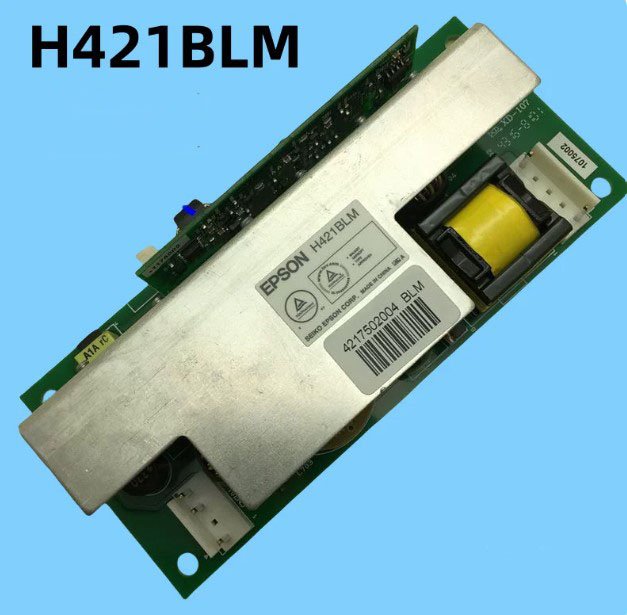
Epson EH-TW9200 Ballast Replacement (Or called as lamp driver)– Original Lamp Driver for EH‑TW9000 / TW9500C / TW9510C
If your Epson EH‑TW5800C, TW5810C or TW6500C won’t light the lamp, shuts down with a flashing red error, or the picture flickers and dies – the ballast board is a very common culprit. This Epson H421BLM is the exact replacement that gets your home cinema projector back to full brightness.
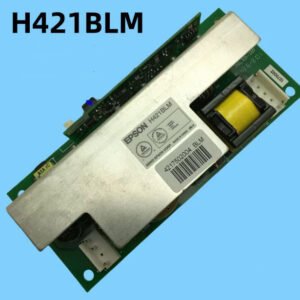
It’s not a refurbished pull and not a generic third‑year copy. Factory spec, with the correct ignition voltage and timing for the TW series. The board is labelled H421BLM – match it with your old one to be sure.
| Compatible Models | Epson EH‑TW9000, EH‑TW9200, EH‑TW95000C and EH-TW9510C (also fits some other 3LCD home models – check original part number) |
|---|---|
| Part Number | H421BLM |
| Component | Lamp Ballast / Lamp Driver Board (powers and ignites the projector lamp) |
| Condition | New, genuine Epson service part (not refurbished) |
Why the ballast board fails – and why you need the genuine H421BLM
After years of use or thousands of lamp strikes, the high‑voltage circuitry on the ballast board degrades. The lamp may fail to ignite, or the board may stop regulating power, causing flicker and shutdown. A generic ballast might use cheaper capacitors or slightly different timing, leading to lamp instability or error codes. This original H421BLM is what Epson designed for the TW9000, TW9200, and TW95000C – it fires the lamp every time and keeps it stable.
Common symptoms that point to a bad ballast
- Lamp does not light – the projector goes through start‑up, you hear the fan, but no light and no ignition buzz.
- Projector shuts down with flashing error – after 30‑60 seconds, the power LED blinks red (usually a lamp or ballast error).
- Flickering then lamp off – the picture flickers for a few minutes, then the lamp goes out and the projector cools down.
- Intermittent operation – sometimes works, sometimes doesn’t; often worse after the projector warms up.
- Hum or buzzing from the ballast area – unusual electrical noise when trying to start the lamp.
If you have already tried a new lamp and cleaned the air filters, the ballast board is the next logical step. Replacing it is a simple board‑swap for anyone comfortable opening the projector.
Restore your Epson TW‑series – not the whole projector
Swapping the H421BLM ballast takes about 15‑20 minutes. Remove the old board, plug the connectors into the new one, and secure it with the original screws. A fresh ballast delivers clean, stable power to the lamp – no more flicker, no more shutdowns. Don’t scrap a perfectly good 3LCD optical engine and electronics because of a failed driver board. Bring your home cinema back to life.
Note: Always unplug the projector and wait several minutes for the high‑voltage capacitors to discharge before replacing the ballast. Send us a photo of your old board if you’re unsure about compatibility.