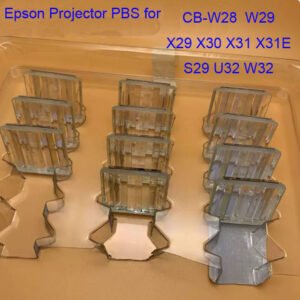
Epson EH-TW5800C PBS Replacement, 32*28MM– Compatible with TW6500C / TW6510C / TW6515C
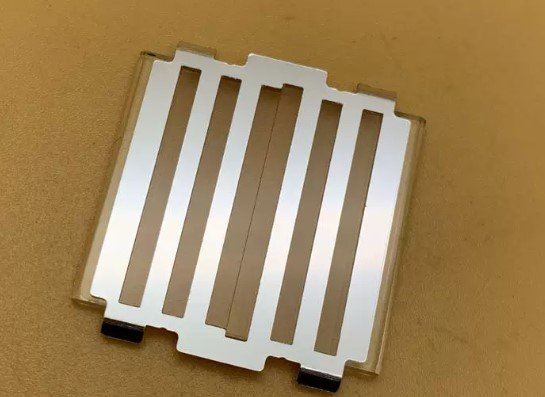
The Projector PBS (polarizing beam splitter) inside the optical engine is often the culprit. If your Epson 3LCD projector is showing uneven brightness across the screen, color patches (usually magenta or green tinted areas), or a noticeable drop in contrast – This genuine Epson PBS prism assembly is the exact replacement part for the listed CB, X, U, W, and S series projectors.
What is the PBS and why does it fail? In Epson’s 3LCD optical engine, the PBS separates and recombines polarized light. Over thousands of hours of heat exposure, the polarizing coating degrades. The classic symptom is a green or magenta discolored patch on one side of the screen, sometimes accompanied by a vertical line or uneven brightness. A failing PBS cannot be repaired – only replaced.
This is not a generic or refurbished part. Factory-spec PBS prism, correct polarization angles, and original coating formulation. The listed models all use the same optical block architecture, making this PBS a direct fit across the entire family.
| Compatible Models | Epson TW6500C / TW6510C / TW6515C – check your original PBS size and mounting |
|---|---|
| Part Type | Polarizing Beam Splitter (PBS) – Part of the 3LCD optical engine assembly |
| Condition | New, original Epson-compatible PBS (not refurbished or salvaged) |
Classic symptoms of a failed PBS in Epson 3LCD projectors
- Color patch on screen – a green, magenta, or yellow discolored area, usually on the left or right side of the image, sometimes covering a third of the screen.
- Uneven brightness – one side of the screen appears darker than the other, even with a new lamp and clean filters.
- Contrast loss – blacks look grayish, and the image appears flat or washed out in affected areas.
- Color temperature shift – whites look pinkish or greenish instead of neutral white.
- Progressive worsening – the symptom starts small and spreads over weeks or months as the coating continues to degrade under heat.
If you have already ruled out the lamp, mainboard, and LCD panels, a failed PBS is highly likely – especially on projectors over 3–5 years old or those run in high ambient temperatures.
What is involved in replacing the PBS?
PBS replacement is an advanced repair. The PBS sits deep inside the optical engine, between the polarizing filters and the LCD panels. To replace it, you will need to remove the mainboard, lamp housing, and fan assembly to access the optical block. The old PBS is unclipped from its mount, and the new one is installed in the same orientation (alignment is critical).
We recommend this repair for experienced technicians only. If you are unsure, the service manual (available on request) walks through the full disassembly and reassembly procedure. The PBS itself is a direct drop‑in – no calibration or alignment software is required, but careful handling of the optical surfaces is essential.
Restore your Epson business projector – not the whole unit
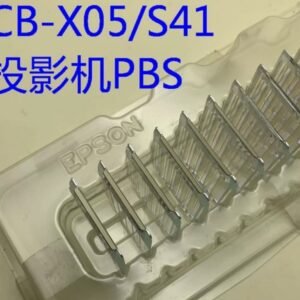
A new original PBS costs a fraction of replacing a whole projector. If your CB‑X05 or S41 has developed the telltale color patch, swapping the PBS gives you a perfectly uniform image again – no more distracting discoloration, no more uneven brightness. Keep your classroom or conference room projector running for years without spending on a full replacement.
Note: Because PBS failure symptoms can sometimes resemble LCD panel failure, send us a photo of your screen showing the discoloration before ordering. We can help confirm whether the PBS is the likely cause.