
Acer H5360 Color Wheel Replacement – Original Spare Part
If your Acer H5360 projector exhibits flickering colors, random color shifts, loud spinning noise, or sudden shutdown shortly after startup – the color wheel is very likely the culprit. This direct replacement restores full image quality without the cost of a new projector.
How This Component Works
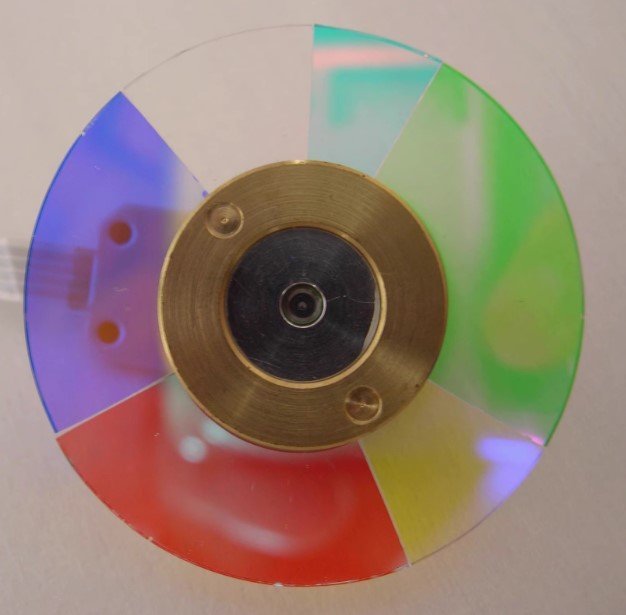
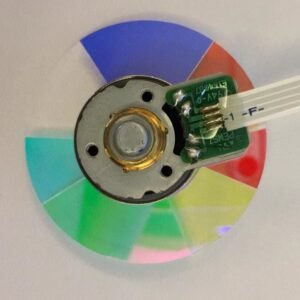
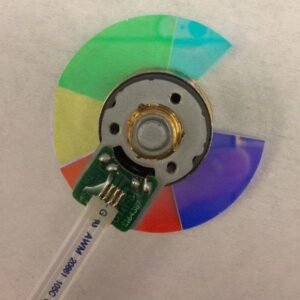
In DLP projectors, the color wheel spins at high speed to sequentially split white light into separate color primaries, synchronized with the DMD chip. The H5360 uses a 6‑segment RYGCWB arrangement (Red, Yellow, Green, Cyan, White, Blue). The yellow and cyan segments extend the color gamut for more natural skin tones and deeper greens/blues, while the white segment boosts overall brightness – exactly the balanced design for home theater use.
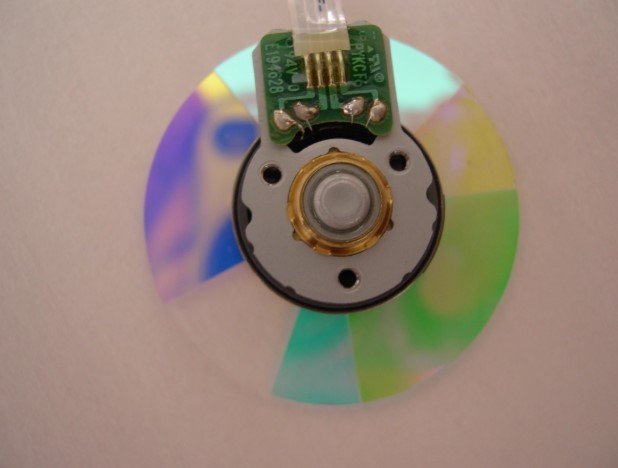
This replacement features a Nidec high‑speed motor running at 3x rotation speed – the exact OEM timing required for the H5360 optical engine. The pre‑balanced bearing assembly minimises vibration and ensures stable colour synchronisation.
Common Failure Symptoms
- High‑pitched screeching or grinding noise during startup (indicating bearing wear).
- Flickering or intermittent colour distortion – colours may flash or shift unpredictably.
- Projector powers on but shuts down after a few seconds – often a colour wheel sync error.
- Persistent colour inaccuracy (e.g., overly green or magenta skin tones) that cannot be corrected via menu settings.
If you encounter any of these, the colour wheel is the most cost‑effective part to replace.
Compatibility – Check Before Ordering
This wheel is designed specifically for the Acer H5360. Perhaps this color wheel can work with other brand or models proejctors, to confirm fitment, please:
- Remove your old colour wheel and compare the segment sequence (must be RYGCWB) and the outer diameter.
- If uncertain, take a clear photo of your old wheel and send it to us – we will confirm compatibility before you install.
Important: If you projector was not Acer H5360, please contact us firstly . Do not assume cross‑model compatibility.
Technical Specifications
| Compatible Model | Acer H5360 (verify with old part) |
| Segment Pattern | 6‑segment RYGCWB (Red‑Yellow‑Green‑Cyan‑White‑Blue) |
| Rotation Speed | 3x speed |
| Motor | Nidec high‑speed brushless motor with pre‑installed bearing |
| What’s Included | 1× colour wheel (factory‑balanced) |
| Authentication | Acer‑style traceability barcode label included |
| Warranty | 12‑month replacement warranty / 30‑day returns |
⚠️ Critical Installation Notes
Precision optical component – handle with extreme care.
- Always grip by the edges; never touch the glass surface. Dust, fingerprints or ESD can degrade optical performance.
- Professional installation is strongly recommended. Incorrect handling may damage the glass segments, misalign the sensor, or cause wheel fracture.
- Disconnect power and allow the projector to cool for at least 30 minutes before opening the chassis.
- After installation, if you hear abnormal vibration or the projector fails to start, re‑check the mounting screws (do not overtighten) and the flex cable connection.
We provide free installation guidance (photos/videos) upon request, but we are not responsible for damage caused by improper installation.
Frequently Asked Questions
Q: How do I confirm it’s the colour wheel and not the lamp or mainboard?
A: If the lamp ignites and the image appears but with flickering or wrong colours – or if the projector shuts down with a fan‑like noise – the wheel is the prime suspect. A diagnostic error code (if available) can also help.
Q: Will this fix flickering colours?
A: Yes, if the flickering is caused by an unbalanced or worn colour wheel. However, other optical issues (e.g., DMD failure) can produce similar symptoms – if unsure, please consult our support team.
Q: Does the authenticity barcode guarantee original Acer quality?
A: This is a high‑grade aftermarket replacement that meets or exceeds OEM specifications. The barcode is for traceability and quality control, not Acer brand endorsement.
Q: What if the outer diameter or segment order doesn’t match?
A: Do not install – contact us immediately with a photo of your old wheel. We will advise or exchange if needed.
Shipping & After‑Sales Support
- Fast dispatch: Orders ship within 48 business hours, with tracking worldwide.
- Safe packaging: Anti‑static foam + rigid box to prevent transit damage.
- Hassle‑free returns: If the product arrives damaged or is not compatible, we cover return shipping. You also have 30 days to return for any reason (packaging must be intact).
- 12‑month warranty: We replace any defective unit free of charge – no arguments.
✔ Restore accurate colours and quiet operation on your Acer H5360 – order the correct replacement today.
Reviews
There are no reviews yet.