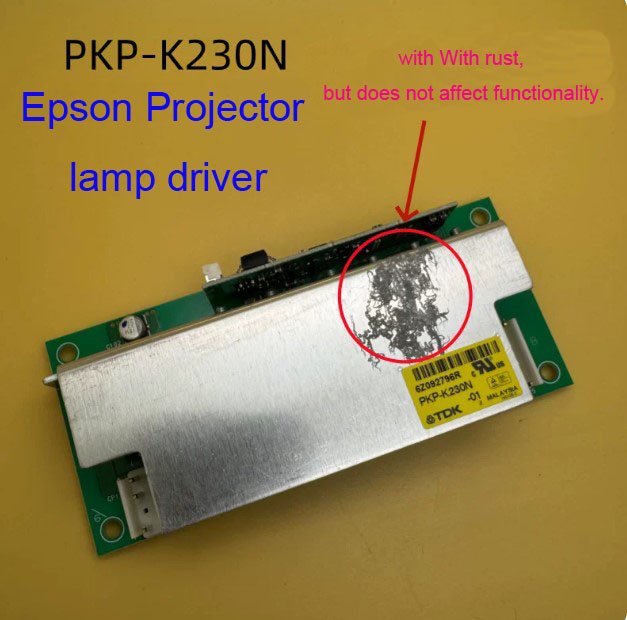
Epson PKP-K230N Ballast (Yellow Label) – Lamp Driver for EB-C1020XN / C2100XN Projectors
If your Epson EB-C1020XN or C2100XN projector powers on, but you see three indicator lights flashing simultaneously and the lamp never lights – the ballast board (also called the lamp power supply, lamp driver, or igniter board) has failed. This genuine Epson PKP-K230N ballast with the yellow label is the exact replacement part that restores normal lamp operation.
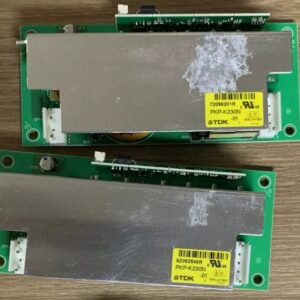
⚠️ Critical compatibility note: This is the yellow‑label PKP-K230N. A white‑label version of PKP-K230N also exists but is not compatible with the C1020XN or C2100XN. The yellow label board is required for these XGA installation projectors. Installing the wrong version will cause the same error – no lamp and flashing lights.
The ballast board (also referred to as the lamp power supply, starter board, or lamp driver) provides the high‑voltage strike to ignite the UHE lamp and then regulates its power during normal operation. When the ballast fails, the projector cannot light the lamp, and the status LEDs usually flash in a repeating pattern – in many cases, all three LEDs (Power, Lamp, Temp) flash together.
| Compatible Models | Epson EB‑C1020XN, EB‑C2100XN (also fits EB‑C1010X, EB‑C1040XN – check your original board label) |
|---|---|
| Part Number / Label | PKP‑K230N – ✧ Yellow Label only ✧ (White label is electrically incompatible) |
| Component Type | Lamp Ballast Board / Lamp Power Supply / Lamp Driver / Igniter Board |
| Condition | New, original Epson service part (not refurbished) |
| Installation | Direct replacement – board is accessible after removing the lamp housing and top shield. Same mounting holes and connectors as the original yellow‑label board. |
| Typical Ballast Failure Symptom | All three indicator lights flash repeatedly – Power, Lamp, and Temp LEDs blink together. The fan runs, but the lamp never ignites. |
| Alternative Names | Lamp power, Ballast, lamp driver |
Why three flashing LEDs point to a bad ballast
On the EB‑C1020XN and C2100XN, the projector runs a self‑check before attempting to strike the lamp. When the ballast board fails:
- Symptoms: The projector powers on (fans run, status lights come on), but the lamp does not light. After about 30‑60 seconds, all three indicator lights (Power, Lamp, Temp) begin flashing simultaneously. This is the projector’s way of signaling a ballast communication or ignition failure.
- What it is NOT: A new lamp will not fix this – the lamp is fine. The main board is usually fine. The ballast is the single point of failure.
- Why the yellow label matters: The yellow‑label PKP-K230N has specific timing and voltage parameters for the C1020XN / C2100XN. The white‑label board looks similar but uses different ignition characteristics, leading to the same error or permanent lamp damage.
If your projector has high hours (over 3,000‑5,000 lamp hours) or has experienced power surges, the ballast is highly likely to have aged out. Replacing it with this genuine yellow‑label PKP-K230N is a straightforward fix – much cheaper than buying a new projector.
Restore your EB‑C1020XN or C2100XN – not the whole projector
Swapping the ballast board takes about 10‑15 minutes. Remove the lamp cover and the lamp itself. Then remove the metal shield covering the ballast (usually 2‑3 screws). Unplug the two connectors (lamp input and main power), unscrew the ballast, and replace it with the new yellow‑label unit. Once reinstalled, the three‑light flashing error will disappear, and the lamp will ignite normally.
Don’t scrap a perfectly good 3LCD optical engine and mainboard because of a failed lamp driver. This genuine Epson ballast restores full lamp operation and gives your projector a second life in the classroom or conference room.
Note: Before ordering, remove your old ballast and confirm it has the yellow label with PKP-K230N printed on it. If your board has a white label or a different code, please send us a photo for compatibility confirmation.